Risk & Controls is launching the Department User Access Certification, an annual review of the Oracle Financial Cloud (OFC) access in each department. Thank you in advance for your partnership in completing it.
Key dates
- Spreadsheet arrives October 21, 2026 RSAs receive their department's spreadsheet by end of day.
- Certification due December 4, 2026 Please complete your department's certification by this date.
What is this?
As part of our annual access review and audit compliance requirement, RSAs are asked to review their department's OFC access, including Jaggaer, Concur and TOE roles, and confirm that users continue to have the appropriate access based on their current responsibilities. The review helps keep access accurate and appropriate, identifying access that is no longer needed.
What do I need to do?
Review the users and access associated with your department and confirm whether each user should keep their current access. For each user, consider:
- Does this person still need this access?
- Is the access appropriate for their current role and responsibilities?
- Is there any access that should be removed?
Important: RSAs should not certify their own access. If your own access is included in the review, identify the appropriate person to complete that certification.
How do I complete the review?
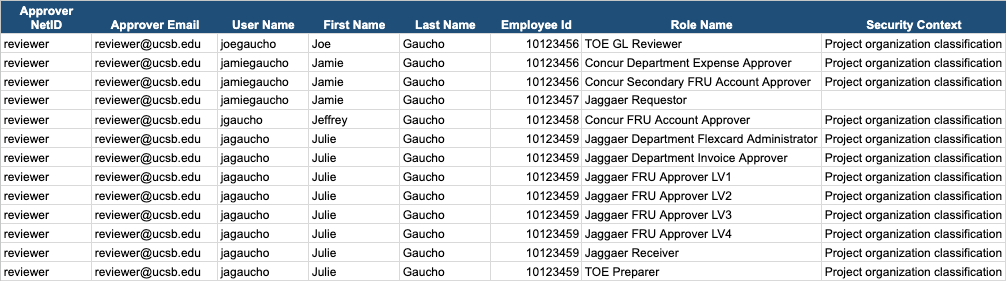
Each departmental RSA receives a separate email with a link to their department-specific spreadsheet and instructions. If more than one RSA covers a department, each of you receives the full list. Each row is one access assignment: the user, their role, and the security context the access covers, where one applies.
Review each row: the user, the role and the security context.
Image
The spreadsheet lists each user, their role and its security context. The names shown are sample data.
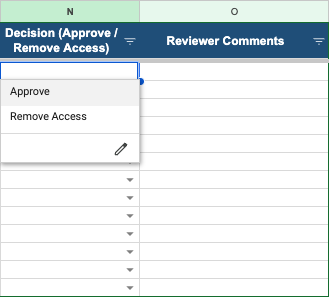
For every row, choose Approve or Remove Access in the Decision (Approve / Remove Access) column. Approve means the person still needs this access. Remove means they no longer need it. Use the dropdown in the cell.
Image
Click the cell in the Decision column to open the menu, then choose Approve or Remove Access. Add any comments in the next column.
- Use the Reviewer Comments column for anything we should know, for example "left the department 6/2026" or "role changed, should be Approver not Preparer".
- If a person or row looks unfamiliar, or you think a row is missing, note it in Reviewer Comments instead of leaving it blank.
- Complete your spreadsheet by December 4, 2026, following the instructions provided in your email.
Things to know
- The list is a snapshot. It reflects access as of the date stated in your email. Access granted, changed or removed after that date is not on your list, so review the list as it was on that date and separately tell us about any changes you have made since.
- Rows with no department are still yours. A blank department means the person's role has no FRU on it. They appear on your list because their other roles are in one of your departments.
- Not your department? If a department on your list is no longer yours, or another RSA should review it, say so in Reviewer Comments so we can update our records.
Need help?
We will be available throughout the certification period to answer questions and help with the review.
- Office hours: Book a 15-minute appointment (Google Calendar). The Zoom link is on the booking page.